My New Home Lab Upgrade
I upgraded my home lab from two Dell PowerEdge servers to a powerful, compact ASUS PN50 MiniPC. With Proxmox, OpenMediaVault, and tools like Portainer and AdGuard, this setup boosts performance and saves energy, making it perfect for efficient VM management and network storage in a small footprint.

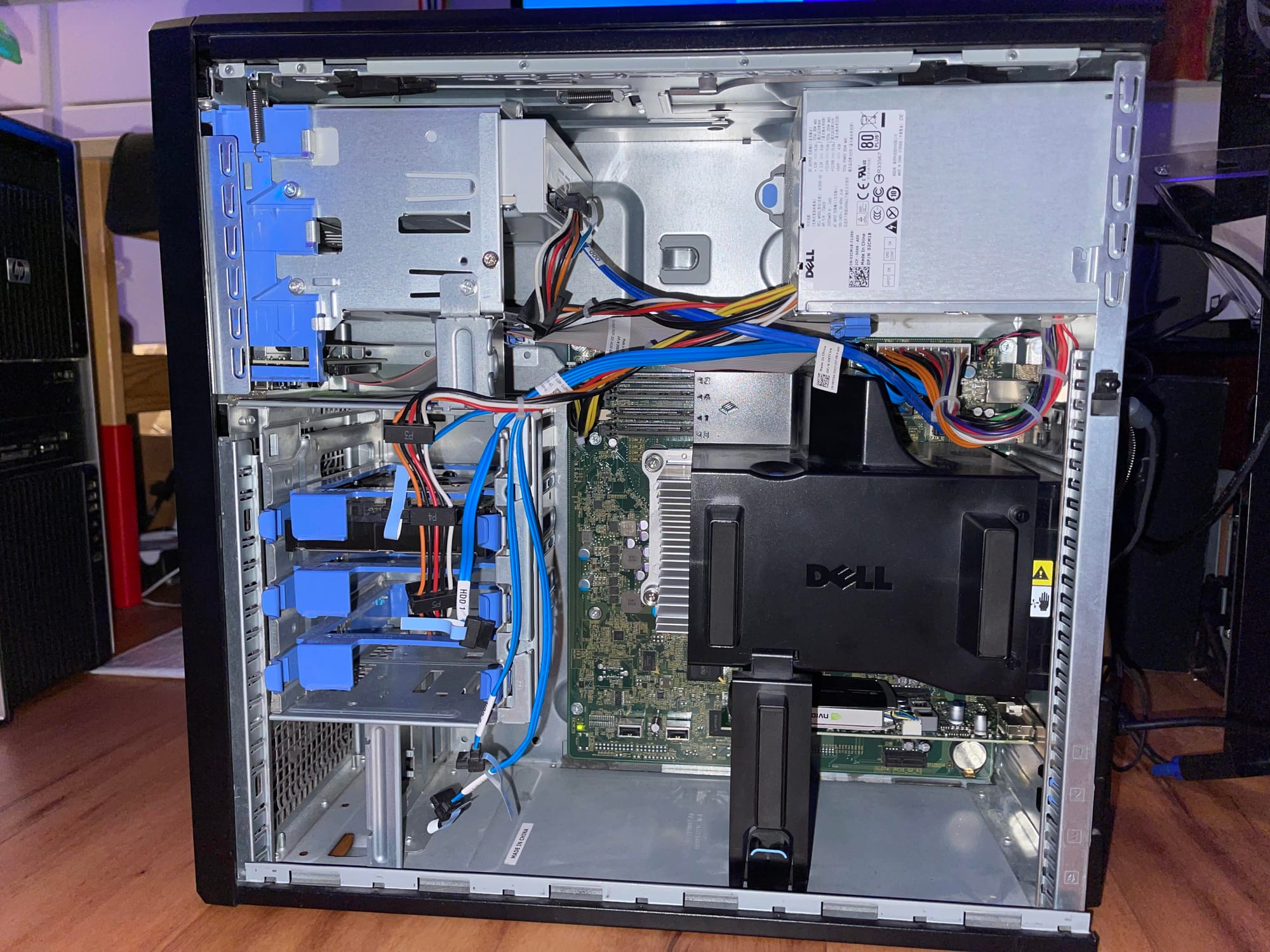
From Dell PowerEdge to a Compact and Efficient Setup
After years of using two Dell PowerEdge T110ii servers, I decided to upgrade my home lab to something more compact and efficient without sacrificing performance. My goal was to streamline the setup, reduce power consumption, and increase performance to handle modern workloads more effectively. With the ASUS PN50 MiniPC and a few supporting tools, I’ve created a lab that surpasses my old setup in nearly every way.
Why the Change?
While the Dell PowerEdge servers were reliable, they took up a lot of space, generated significant noise, and consumed a lot of power. My main objectives in upgrading were to:
- Reduce physical footprint and noise.
- Improve power efficiency, lowering energy costs.
- Increase performance to run more VMs and containers simultaneously.
The New Hardware:
Here’s a breakdown of the main components in my new home lab setup:
- ASUS PN50 MiniPC (R7-4700U)
- Featuring an AMD Ryzen 7 4700U processor, this compact powerhouse is perfect for my lab. It’s small, power-efficient, and capable of handling multiple virtual machines (VMs) and containers.
- Cost: $249.99
- Samsung 1TB 970 EVO+ NVMe M.2 SSD
- This NVMe SSD handles my VM storage needs with lightning-fast read and write speeds, greatly improving responsiveness and data access times.
- Cost: $79.99
- G.SKILL 32GB DDR4 3200 RAM (x2)
- With 64GB of high-speed DDR4 memory, I can manage multiple VMs and containers efficiently.
- Cost: $149.98
- TERRAMASTER D4-300 USB 3.1(Gen1) Type-C External Hard Drive Enclosure
- This external enclosure provides flexible and scalable storage, allowing me to add or swap hard drives as needed.
- Cost: $169.99
- HGST Ultrastar 7k6000 HUS72606ALE610 6TB 7200 RPM 128MB Cache SATA 6.0Gbps 3.5 Enterprise HardDrive (x3)
- Designed to run 24/7, Enterprise class reliability spinning disks
- Cost: $269.97
Software and Virtualization Tools:
I’m using several open-source tools to maximize the functionality of my hardware:
- Proxmox: My main hypervisor, giving me control over my VMs and containers with a user-friendly interface.
- OpenMediaVault (OMV): A NAS solution that allows me to centralize file storage across my network.
- Portainer: Simplifies Docker container management with an intuitive web UI.
- AdGuard Home: Provides network-wide ad blocking, enhancing privacy and performance.
- Nginx Proxy Manager: Handles SSL termination and routing across services, making it easy to manage secure connections.
Performance Comparison:
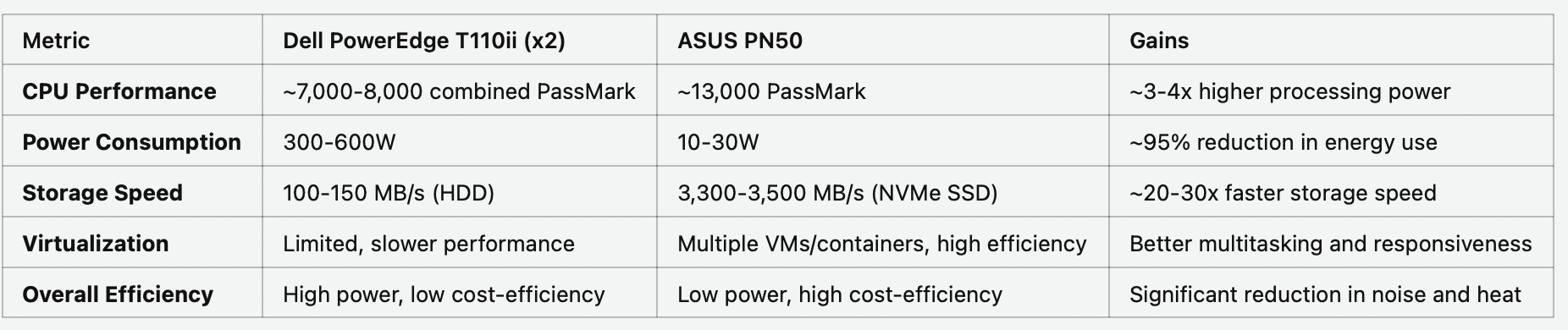
Below is a table summarizing the estimated performance gains, energy savings, and storage improvements of my new ASUS PN50 setup compared to the older Dell PowerEdge T110ii servers.
Energy Savings and Performance Gains:
Switching to the ASUS PN50 setup has not only boosted performance but has also drastically reduced power consumption. The Dell PowerEdge servers consumed up to 600 watts at full load, while the ASUS PN50 averages around 25 watts.
Estimated Annual Power Savings
Using Philadelphia’s average electricity rate of $0.16 per kWh, here’s an estimated breakdown of annual power costs:
- Old Setup (Dell PowerEdge T110ii x2):
- Average consumption: 450 watts (assuming mixed usage between idle and load).
- (450W x 24 hours x 365 days) / 1000 x 0.16 = $630.72 per year.
- Annual cost = $630.72
- New Setup (ASUS PN50):
- Average consumption: 20 watts.
- (20W x 24 hours x 365 days) / 1000 x 0.16 = $28.03 per year.
- Annual Cost = $28.03
Total Estimated Annual Savings:
$630.72 - $28.03 = $602.69
By upgrading to the ASUS PN50, I’m saving approximately $602 per year in energy costs. Not only does this reduce my operational expenses, but it also lowers the environmental footprint of my home lab significantly.
Conclusion:
Upgrading to the ASUS PN50 has been a fantastic investment. This compact device has given me the performance I need for my professional and personal projects, all while lowering my energy consumption and freeing up physical space. With Proxmox, OpenMediaVault, Portainer, AdGuard, and Nginx Proxy Manager, my new home lab setup is powerful, efficient, and scalable—everything I need to support my evolving projects.
Disclaimer: The views and opinions expressed on this website are solely those of the author and do not necessarily reflect the official policy or position of any employer or organization affiliated with the author.