Modern Homelab Ingress with Cloudflare Tunnel
I rebuilt my homelab ingress architecture using Cloudflare Tunnel, Nginx Proxy Manager, Docker bridge networks, and end-to-end TLS on a ZimaCube 2 to eliminate inbound exposure, segment traffic, and create a more modern self-hosting environment.

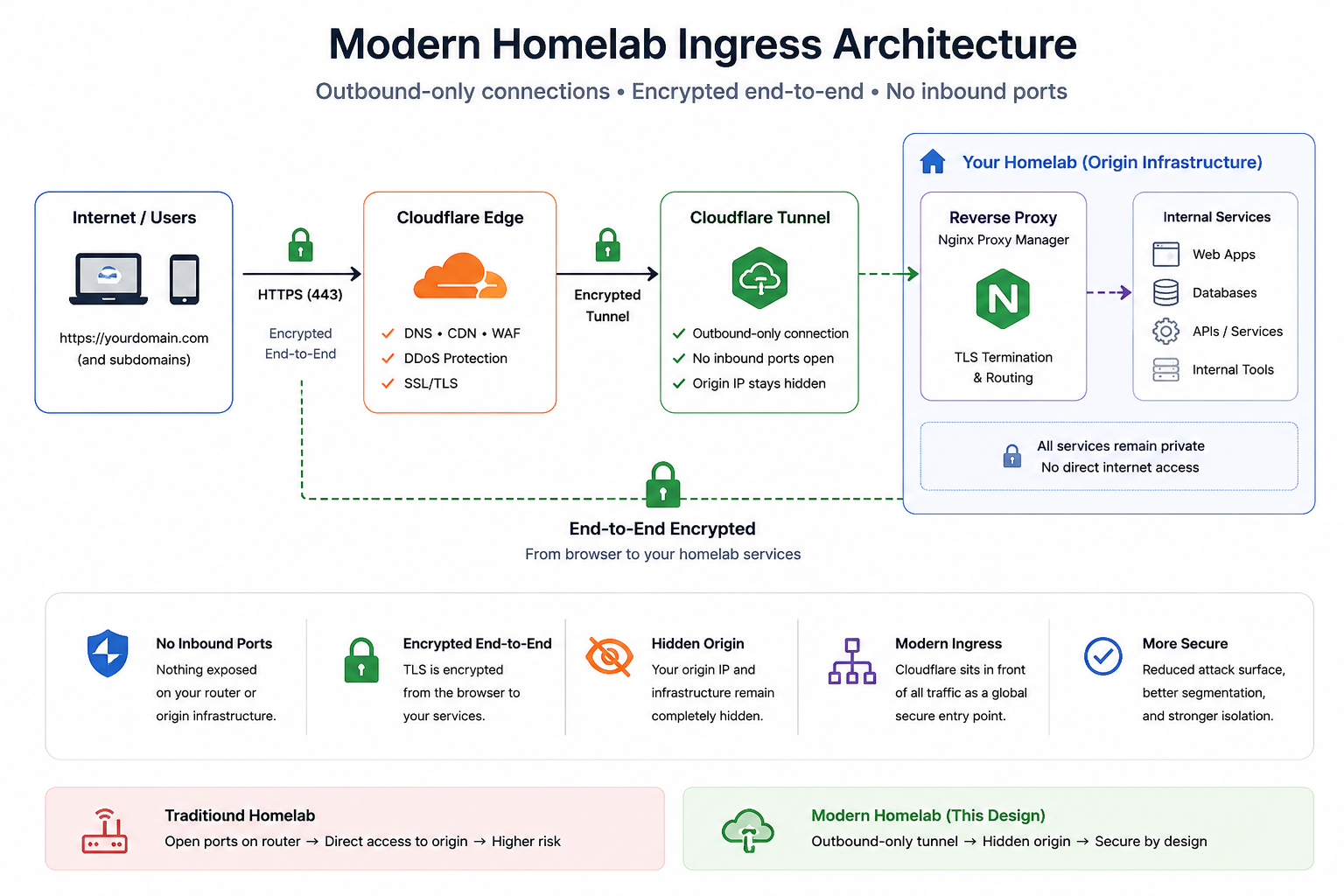
I wanted to redesign my homelab ingress architecture around outbound-only trust, segmented Docker networking, and end-to-end encrypted traffic.
Modern self-hosting is no longer just about getting services online.
It is increasingly about:
- reducing exposure
- controlling ingress
- encrypting traffic end-to-end
- segmenting workloads
- minimizing attack surface
Over the last few weeks, I rebuilt my reverse proxy architecture on a ZimaCube 2 using:
- Docker Compose
- Cloudflare Tunnel
- Nginx Proxy Manager (NPM)
- Docker bridge networks
- end-to-end TLS
- ACL-restricted internal services
The goal was simple:
Stop exposing my infrastructure directly to the internet.
Why I Chose the ZimaCube 2
The entire stack runs on a ZimaCube.
I wanted:
- low power consumption
- quiet operation
- compact footprint
- Docker flexibility
- always-on reliability

At this point, the ZimaCube 2 has effectively become:
- a Docker host
- a reverse proxy platform
- an ingress layer
- a centralized infrastructure appliance
For modern self-hosting, that combination is extremely practical.
The Traditional Homelab Problem
A lot of homelabs still look like this:
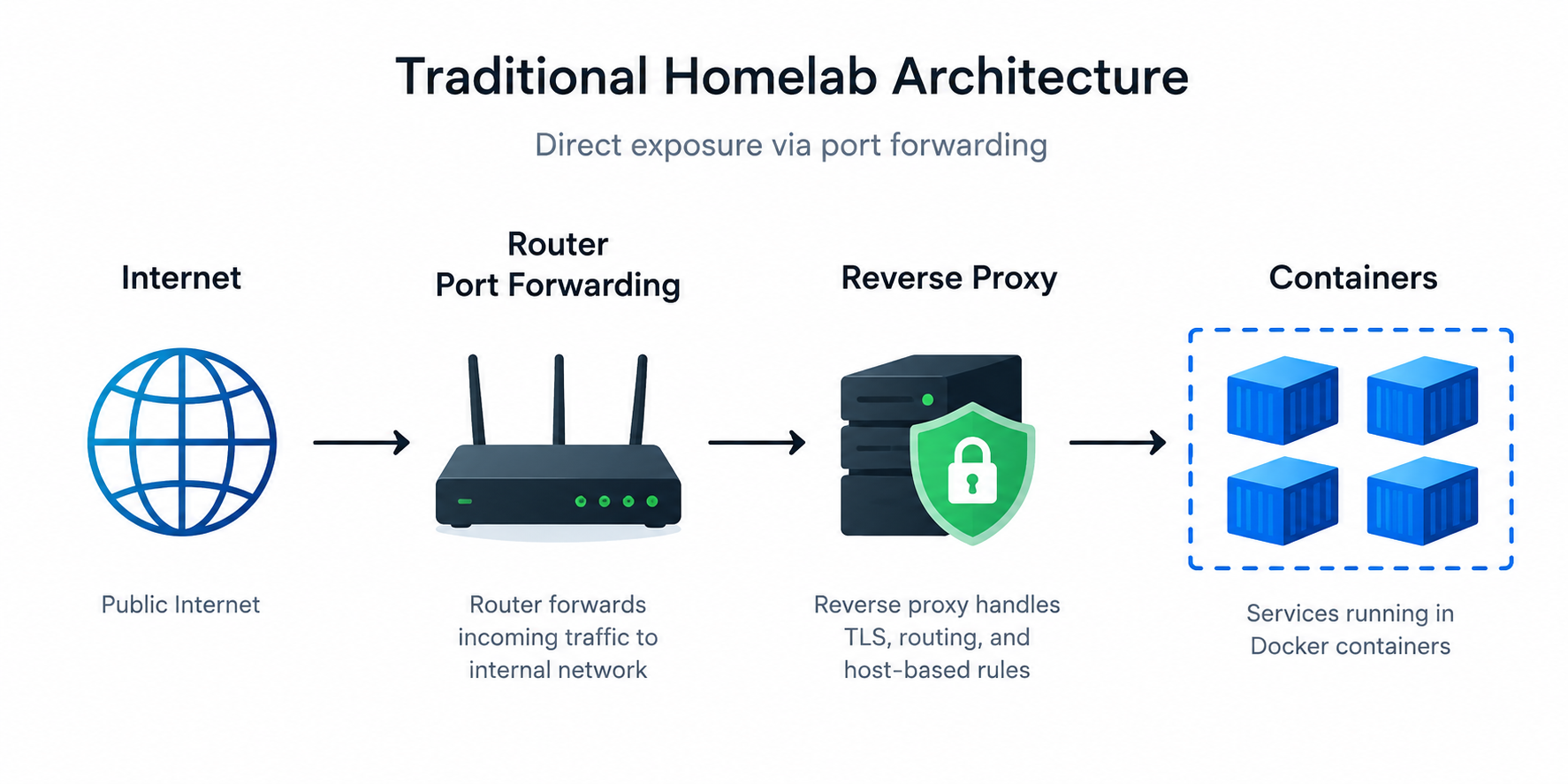
This creates several problems:
- publicly exposed ingress ports
- directly reachable origin infrastructure
- open attack surface
- easier infrastructure reconnaissance
- exposed admin interfaces
Even with HTTPS enabled, the infrastructure itself remains publicly reachable.
I wanted to eliminate inbound exposure entirely.
The New Architecture
The new design became:
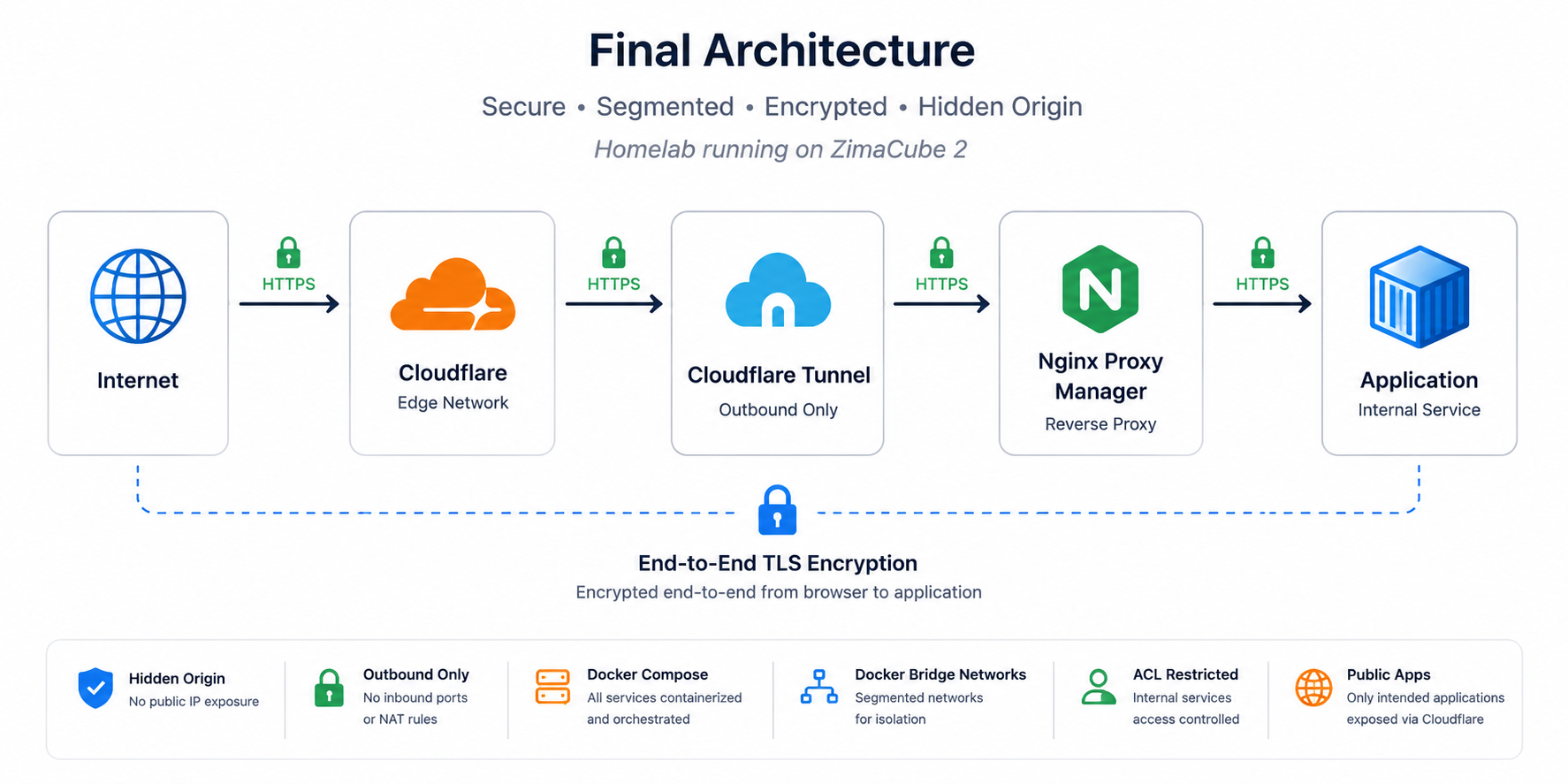
Instead of opening ports on my router:
- Cloudflare Tunnel creates outbound-only encrypted connections
- the origin infrastructure remains hidden
- Cloudflare sits in front of all public traffic
- TLS remains encrypted end-to-end
This immediately felt closer to modern cloud ingress architecture than a traditional homelab setup.
Docker Network Segmentation
One of the most important changes was separating traffic using Docker bridge networks.
docker network create \
  --subnet 172.x.x.x/24 \
  edge
Containers attached:
- Cloudflare
- nginx-proxy-manager
Applications themselves live separately on internal Docker networks.
This creates a controlled boundary between:
- ingress traffic
- internal workloads
- infrastructure services
One important lesson from modern infrastructure:
Not every container should be internet-adjacent.
Replacing Port Forwarding with Cloudflare Tunnel
Cloudflare Tunnel replaced traditional port forwarding entirely.
Docker Compose setup:
services:
  cloudflare:
    image: cloudflare/cloudflared:latest
    restart: unless-stopped
    networks:
      - edge

networks:
  edge:
    external: true
This established:
- encrypted outbound tunnels
- hidden origin infrastructure
- zero inbound NAT rules
- Cloudflare edge routing
- simpler handling of residential dynamic IPs
This was one of the biggest security improvements in the entire project.
The HTTPS Problem I Encountered
This ended up becoming the most interesting engineering lesson in the project.
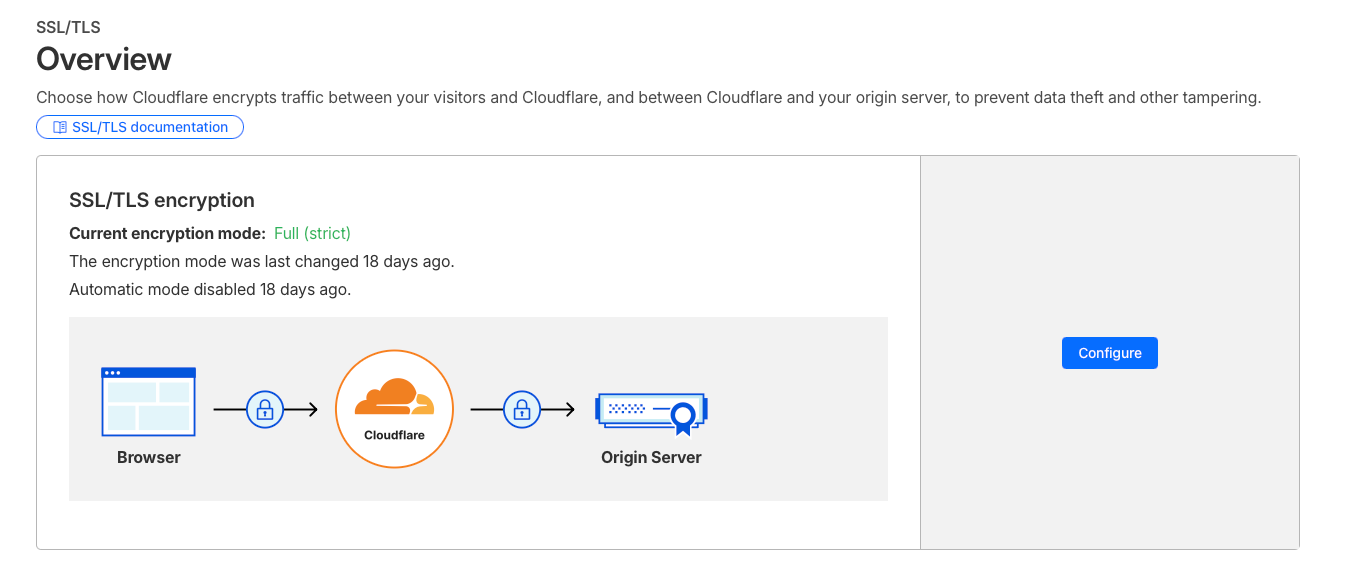
Initially:
http://reverse-proxyworked immediately.
But:
https://reverse-proxyfailed.
At first, this was confusing because SSL certificate itself was valid.
The real issue was TLS hostname validation.
The certificate was issued for:
example.com
app.example.com
But Cloudflare Tunnel was internally connecting using:
reverse-proxyThe hostname mismatch caused HTTPS validation to fail.
This was a good reminder that TLS validation is not just about:
- certificate trust
- expiration dates
It also validates:
- hostname identity
- SNI expectations
The fix was configuring Cloudflare Tunnel with:
Origin Server Name:
example.com
while still routing internally to:
https://reverse-proxy:443That preserved:
- encrypted transport
- proper hostname validation
- full TLS verification
without disabling security checks.
This ended up being one of the most useful operational lessons from the rebuild.
Internal Services vs Public Services
One of the most useful parts of this architecture is separating:
- public internet-facing applications
- internal-only infrastructure services
Public services flow through:
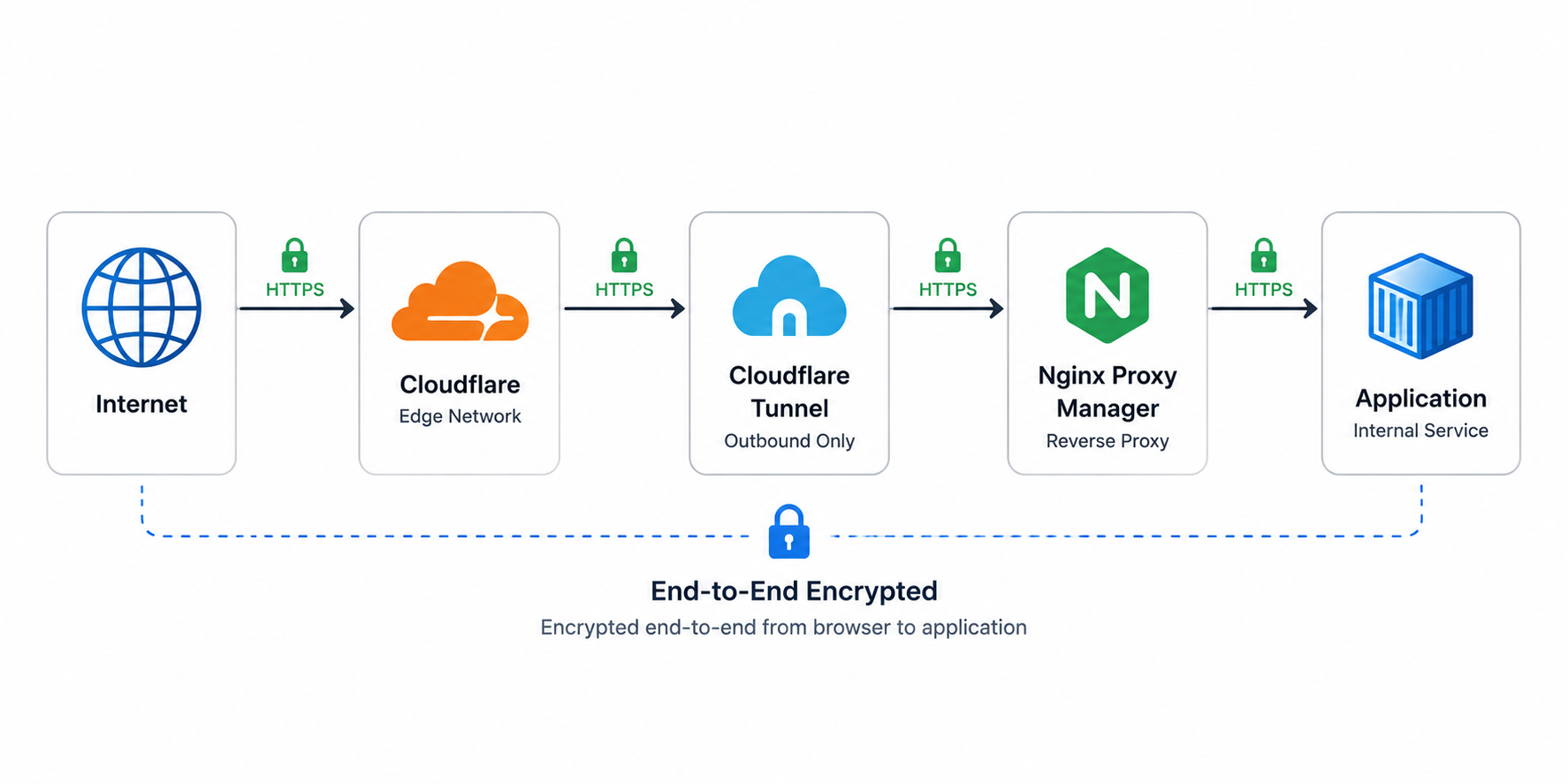
Internal services stay LAN-only using ACL restrictions.
Example ACL:
Allow:
192.x.x.x/24
172.x.x.x/24

Deny:
all
One operational lesson I learned very quickly:
Reverse proxies often see:
- Docker bridge IPs
- tunnel IPs
- internal proxy IPs
instead of the original client IP.
Initially, I accidentally locked myself out of NPM because I only allowed my LAN subnet.
NPM was actually seeing traffic from the Docker bridge network.
Adding the Docker subnet resolved the issue immediately.
That was a very real reminder that infrastructure traffic paths are often different from what we assume on paper.
Final Architecture
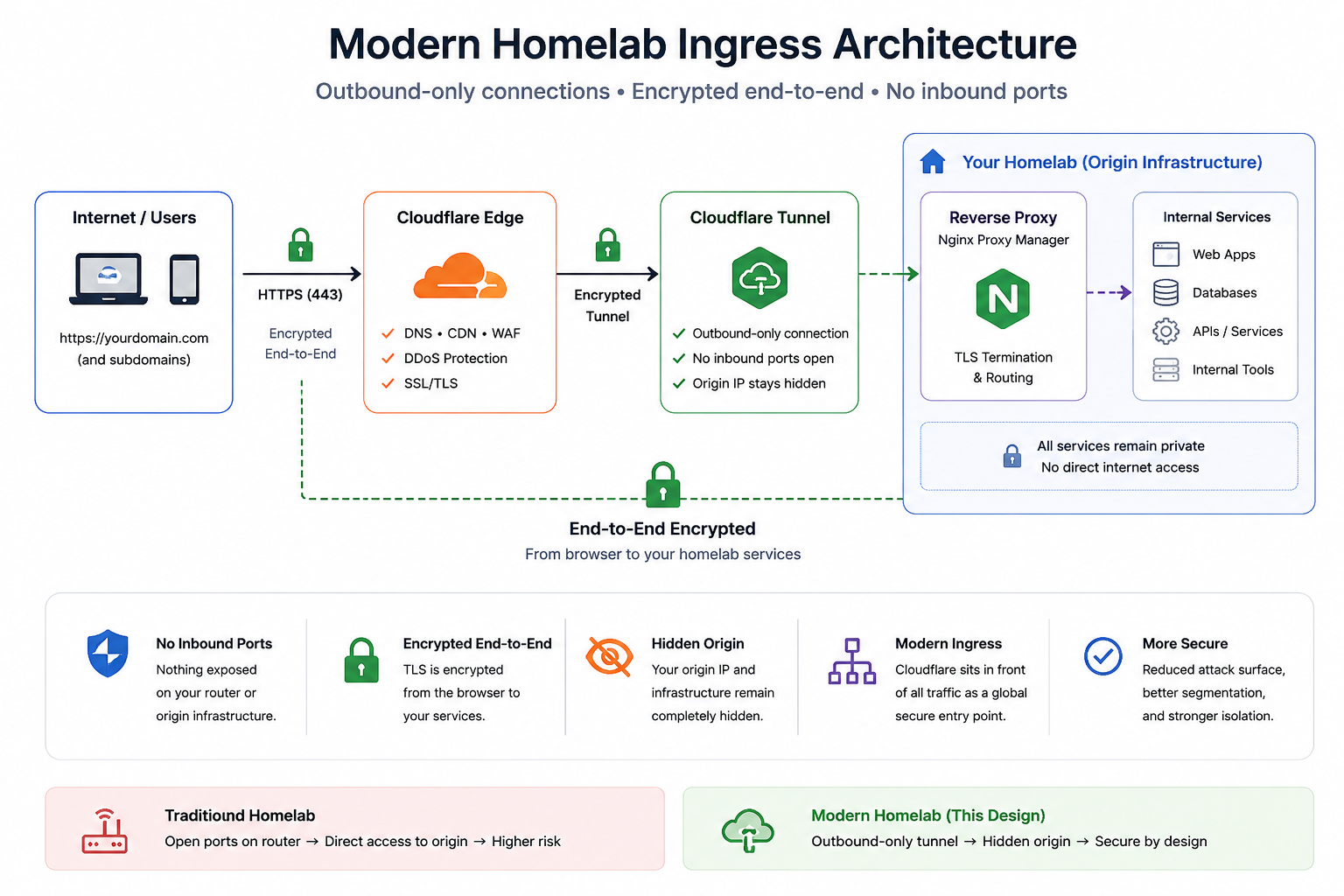
The final stack now looks like this:
- ZimaCube 2
- Docker Compose
- Cloudflare Tunnel
- Nginx Proxy Manager
- Docker bridge networking
- end-to-end TLS
- ACL-restricted internal services
- public internet-facing applications
- hidden origin infrastructure
It is still a homelab.
But the operational model now resembles modern ingress engineering far more closely than traditional port-forwarded self-hosting.
The biggest realization from this project was this:
Modern self-hosting increasingly requires the same ingress, networking, and trust-boundary thinking found in production infrastructure.
Disclaimer: The views and opinions expressed on this website are solely those of the author and do not necessarily reflect the official policy or position of any employer or organization affiliated with the author.